Adventures in Loxone: 3 - Lighting - Color!
This time, I go into what RGB color is, what the sRGB color space is, and I might even touch on bit-depth of linear color vs sRGB color and more.
10/28/20248 min read
Quantifying Color
Most computer and electronic systems use three-channel, "RGB" color - red, green, blue. Specifically, the "sRGB" standard. In this standard, each representable color is represented by a triple of values, where black is (0,0,0), and white is (max,max,max) (often max is 255, but not always). Pure red would be (max,0,0), pure green (0,max,0), and pure blue (0,0,max). Those are the 'easy values'. Things get far more interesting and complex for values other than 0 and max.
For the rest of this article, I'll likely just set max==255, as it keeps things more obvious, but it's technically possible to have more (think Lutron Ketra).
You might imagine that a grey value of (1,1,1) is about one-half as bright as (2,2,2) but this is explicitly not the case. Similarly, you might imagine that (50,0,0) is half as bright as (100,0,0) and this is also not the case. Worse-yet, the amount that (2,2,2) is brighter than (1,1,1) is not the same amount that (100,0,0) is brighter than (50,0,0). Basically, the step-size of brightness isn't constant as it goes up the scale. The sRGB color codes are not linear. Instead, they map to an exponential curve called the "gamma curve", as shown below:
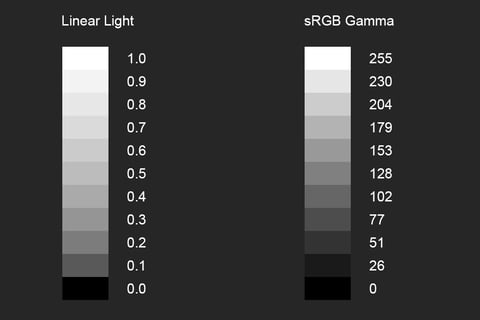
In this image, the 'linear' portion, from 0 to 'max' starts at 'blackest', and likely fairly quickly 'seems' bright to you, being a fairly light gray by about a third of the way up.
In the sRGB gamma space, things likely look more evenly distributed to your eye, with more dark gray tones available, and 'halfway' looking a lot more 'halfway'.
That's because, bluntly, your eyes don't 'see' linear light. They're amazing devices, built to show you details both in the dark corner of a room and in the well lit corner - and they do it across orders of magnitude of light. To compress it down into something your brain can use, they basically do a 'logarithm' operation on the light intensity; so higher values are always more light, but not by the same amounts.
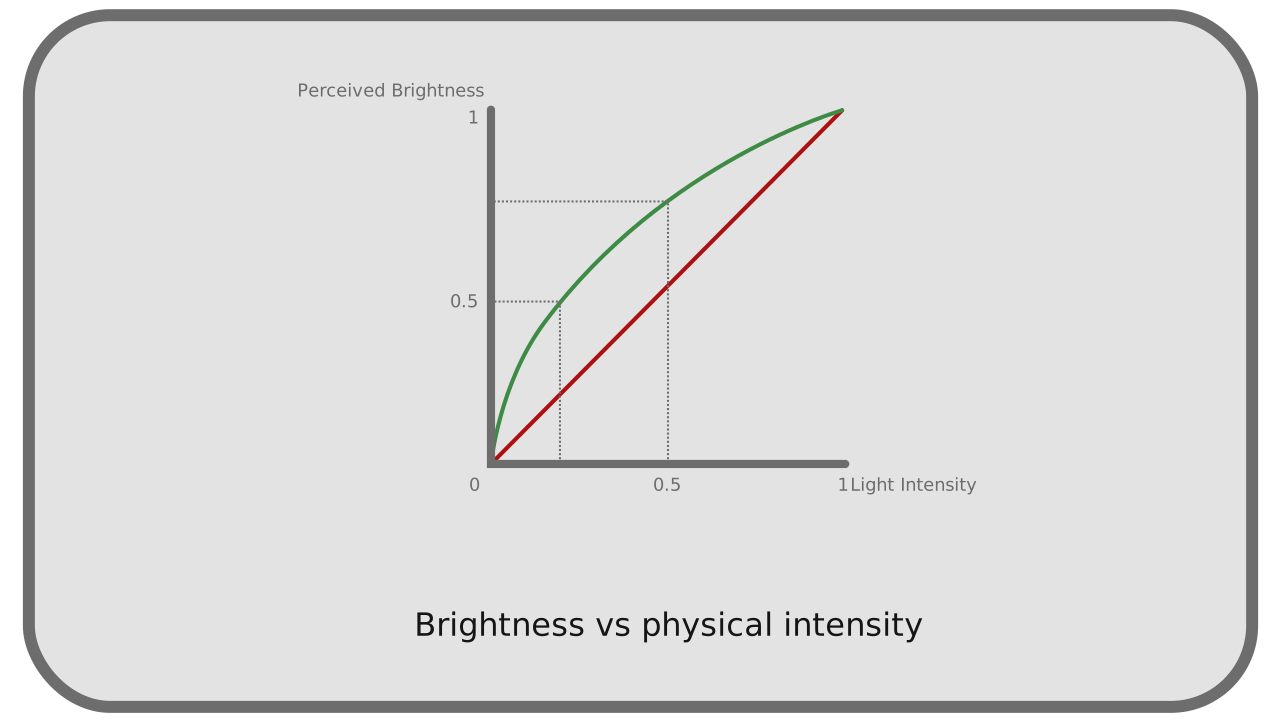
Image sourced from https://rxlab.guide/colors/transfer.html
The figure to the right shows how human perception of the light varies as the actual light intensity varies. So you can see that there's a 'curve shape' there, where your eyes will perceive a low light (e.g. 30% actual intensity) as 50% of your perceived intensity - exactly what happened above, where we had so many light grays, and so few dark grays.
So why am I so focused on this? It's because your computer (and almost everything you work with) represents colors in the sRGB space, which means that yes - half a number looks like half the brightness. This is a 'good thing'. But the actual circuit that makes the light? It has to actually emit the light in 'real amounts'. So Loxone sends the sRGB values all the way to the light - but inside the light, it has to convert to a ratio, of "on time" and "off time". For now, let's just focus on red (it's easier to only talk about one color - but it all applies to all three equally). So if you want 'max red', you send a value of 255, and the light is '100% on, and 0% off'. If you want 'no red', you send a value of 0, and the circuit generates '0% on, 100% off'. But if you want 'half red', you send 127.5 (because perceptually, that is half red) but the circuit itself does not do 50% on, 50% off - because that would look very bright. Instead, the circuit asks for 21.4% on, and 78.6% off, because that looks like half brightness to your eye.
Generally, then `linear_on_time = pow(sRGB, 2.4)` is what most computer systems use, while Loxone uses `linear_on_time = pow(sRGB, 2.0)`. which you honestly would likely never notice, unless you're crazy like me. Now this is where things get interesting. There are only 256 possible values for sRGB in many systems (those we call '8 bit'). So if you wanted to request a change from 240 to 255, technically there are only 15 'steps' or 'values' that the system can take along the way. So if you had someone with very detail-oriented eyes... they might notice. Especially if you were doing it slowly enough. There simply isn't/aren't any more numbers to choose, as most systems don't let you send something like 240.5 - only 240, and 241.
But here's where Loxone gets interesting. Instead of 256 possible values, their protocol only allows sending 0..100 (101 total values). This was incredibly disappointing to me when I first found out. It simply means there are fewer 'steps' between 'off' and 'max', which means it will be more visible, and more 'jerky' when you change colors, and you'll have fewer shades available. I was ... unhappy, especially because Loxone clearly advertises 65,536 values in their marketing materials.
So here's how they make that claim.
While it only allows you to command those 101 values, the way it internally commands them can be special (when using the "Smart Lighting Controller" mode). In this case, it sends "Go from your current value, to this other value, and take XYZ seconds", and the light, internally, can use it's full range, to smoothly step there. And the light's full range? It's got the listed 65,536 values or so, so it can take much smaller steps - and make the resulting 'slide' much more smooth. You're still restricted to the same total 101 'stopping points', but when sliding from one setting to another, it will be perceived as much smoother along the way - not as good as I would have liked, but still something. Sure, Ketra has more values you can stop on ... but Ketra is also $600 per light, and requires a $3000 server, and more.
Details of the Loxone Spot RGBW Tree
The 'default' Loxone light, to me, is the Loxone Spot RGBW Tree. I've discussed it in a previous article on white lighting, but never really addressed the color (RGB) parts - only the 3000K white component. There are some interesting things about this light that I did not expect...
Loxone swears that the maximum power drawn by the light is 7.5W, which you (supposedly) can draw using only the white channel
Loxone also swears that if I then enable the RGB parts, that ... it still, somehow draws 7.5W
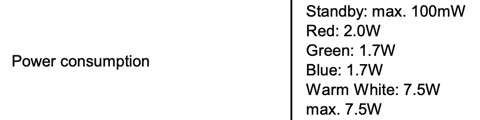

This, to me, makes no sense. How can it possibly draw 7.5W using only the white, and then, when turning on three more colors... still draw the same power? I truly have no idea.
There's more. The Loxone interface naturally and easily exposes "circadian lighting" - a system in which the light is more reddish in the morning, and more blueish near noon. This is great, and I love this. At the same time, the light only contains a single white LED; one that emits 3000K light only. Which means that to make it redder or bluer, it must be using the RGB LEDs included in the bulb. I support this. This makes sense. I really wish they made a Warm+Cool white bulb, but this helps at least.
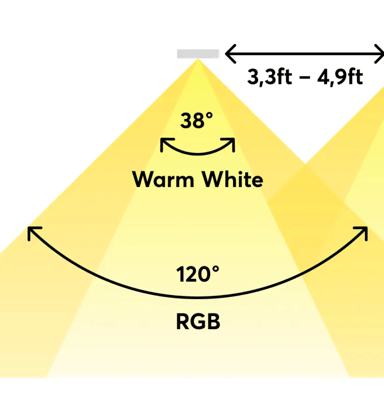
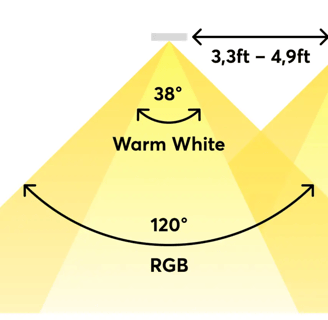
The concern I have, then, is that the documentation notes that the white part is emitted over a 38 degree angle, while the color parts are emitted over a much wider angle (120 degrees). Thus, near the 'fringes' of the illuminated area, you should get only the red/blue light, without any of the white. This seems like a poor overall design, as you'll get uneven lighting.
I haven't seen this much in practice yet, but I've considered setting up a specialized testing area "one of these days" to better quantify things.
Other Color Products
Now, there are two other commonly used Loxone products that have RGBW options: the Ceiling Light and their RGBW LED strips. I have no data or evidence to support this, but I believe and imagine that the Ceiling light likely has very similar colors to the Loxone Spot RGBW. Which is to say, if you configured a given value in your lighting controller, when the two lights attempted to make that color, they'd look the same. This is a good thing, and exactly what you'd want. I would love to check and confirm (Loxone does provide EULUM data files for these lights, but I don't have an active DiaLux install to open them and investigate for sure). I'd really like it if they provided a proper photometric report about their lights, like FlexFireLEDs does, but I haven't been able to get that information from Loxone at this time.
I say all this, because I'm not confident that the RGBW LED strips that Loxone sells will look identical to their Spot RGBWs or Ceiling Lights. It's highly possible that the LEDs they're using come from different batches, different manufacturers, may be driven at different voltages, or may simply have different ratios of Red to Blue to Green, etc.
If you've got a customer who wants museum-grade color reproduction and matching, either look into Lutron Ketra, or reach out to me to talk about real color and lighting science (I'm barely scratching the surface here).
Open Questions to Loxone
Obviously, I've got several questions and thoughts in this article, but I've loved working with Loxone so far, and hope that I can get some of the following information from them:
Can you provide proper color coordinates for the LEDs you use? (e.g. U,V color coordinates)
Can you confirm/explain if my suspicion about 'fringing' on the RGBW Spots is accurate?
Can you explain what happens if I max out the white channel on an RGBW spot (where it should pull 7.5W) and then turn on 'some red'? What is the power consumption then, given that the red channel can draw 2W on its own?
Can you describe/explain how I can specify colors precisely in Loxone Config, to assign them to moods? Given how precise your lighting is, I believe this would either be a floating-point triple, or a triple of 16-bit unsigned integers (in gamma space).
Really Crazy Color Stuff - Fire and Candles
One thing I'd love to offer my clients is the warm glow of fire and candles. That requires not just yellows, oranges, and reds, but also animation, randomization, and uniquely controlling each bulb in a given room (lighting group?).
Currently, the only way I can do this is by using virtual inputs that control each light separately, and then running a Python program on another server that creates and controls the color codes accordingly. This is also the only way I can do other advanced lighting controls, like making the lights match another color (detected from a webcam, or based on the weather, etc), doing more interesting animation effects, and more.
If someone at Loxone is interested in doing Fire/Candles or similar effects, you'll want to sample from the blackbody spectrum, and layer perlin noise on top of that. You'll also want to use a walking/evolving algorithm so that the color shifts over time, etc. I'd eagerly and happily prototype a software package in nearly any language you want (C/C++, Python, etc) that does this, if you can package it into the Lighting controller... Here are some simpler models that are available for reference:
Innovate
Engage
owner@cltsmarthome.com
814-441-1443
© 2025. All rights reserved.
Disclaimer: This site is under construction, and the images are stock, not actual photos of work done by CLT Smarthome Link.